








Running an online store is not just about listing products on a website and waiting for customers to arrive. A Google Shopping Ads Agency can help put your products in front of people who are already searching for what you have to offer. Google Shopping displays relevant products to potential customers when they search on Google, helping online stores reach people who are actively looking for products like theirs.
But simply uploading products and setting an advertising budget won’t ensure good results from your Shopping campaigns. Your product information, campaign structure, bidding, tracking and ongoing optimisation will determine the success of your campaigns. That’s where a Google Shopping Ads Agency can come in.
If this is your first time setting up a Shopping campaign or if you want to improve an existing campaign, it can be helpful to understand what happens behind the scenes. There is a lot to discuss, including Google Merchant Center and product feeds, as well as campaign management and tracking performance.
In this guide, we look at seven practical ways to improve Google Shopping campaigns and what businesses should consider when managing their product advertising.
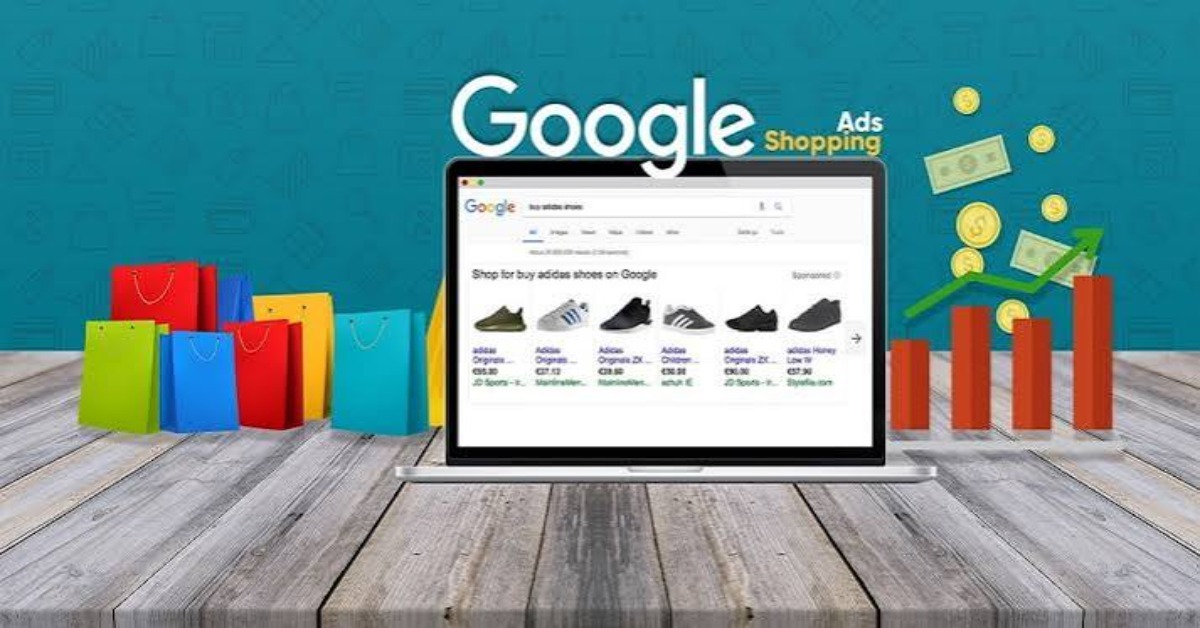
Google Shopping Ads are product listings that show up when people search for products on Google. Unlike traditional text ads, Shopping Ads can show an image of the product, along with its name, price and store.
This gives consumers a quick glimpse of a product and its price before they click through to a website. For ecommerce businesses, this can make Shopping Ads a good way to get products in front of people actively looking for them.
Businesses need to give Google accurate product information to advertise products through Shopping. This is generally done through Google Merchant Center, a place to store product information and send it to Google’s ad systems.
Your product feed matters because it tells Google what you’re selling and contains the information Google needs to match your products to the right searches.
Google Shopping connects your product catalogue to Google’s advertising platform. You provide product information, and Google uses that information to determine if your products might be relevant to shoppers.
The process usually looks like this:
Shopping campaigns are a bit different from traditional search campaigns. Google does not select individual keywords for each product. Rather, it learns from your product feed what searches could be relevant.
So product titles, descriptions, categories, prices, images and other attributes are important.
A Shopping campaign is usually a routine maintenance task. Even with a good start, the performance of the campaign can be affected by different levels of competition, demand, prices, inventory levels and customer behaviour.
If you want to improve your Shopping campaigns, there are seven areas you should focus on.
Your product feed is the backbone of a Shopping campaign. It contains information such as product names, descriptions, prices, images and availability, which Google uses to understand your catalogue.
If the information is inaccurate, incomplete or out of date, Google may have trouble understanding your products. In some cases, this can also prevent products from showing in Shopping results.
This is where Product Feed Optimisation needs a little regular attention.
Begin with product titles. They need to be clear about the product and have useful information that a prospective customer may search for. This could be the brand, product type, model, colour, size or another key feature, depending on the product.
Your description should also be accurate to the product and not repetitive. Ensure your prices and stock information are current, particularly if you frequently adjust pricing or availability in your store.
Pictures count as well. Shopping is a visual format, so clear and relevant product images can make it easier for shoppers to understand what you’re offering.
You should always keep a regular eye on your feed to make sure there’s no missing or incorrect information, disapproved products or outdated information. If you address these early, you can help avoid preventable issues in the campaign.
Google Merchant Center is an essential part of managing product information for Google Shopping. It’s where businesses can upload and manage the product data that fuels Google Shopping’s various shopping services.
Listing your products is only the beginning. Also, keep an eye on your Merchant Center account for any issues that may impact your products.
There are a few things to check out:
Keeping this information accurate helps keep your product catalogue up to date.
It can also help to look at which products are getting attention but aren’t producing the results you’re looking for. This can give you useful information when making decisions on what to optimise next.
Organising product data can be a time-consuming process for businesses with large catalogues. A Google Shopping Agency can help with product management and identify areas where your catalogue may need support.
The way you organise your campaigns can affect how easily you can manage and analyse your advertising.
When you try to pack everything into one complicated structure, it can be difficult to see which products are doing well and where your budget is going. A clearer structure can make it a lot easier to manage and report on campaigns.
Not every business has a campaign structure that works for them. It could depend on:
For example, you might want to run campaigns based on product categories, brands, price ranges or other performance tiers.
It should not be a question of having as many campaigns as possible. Instead, the structure should make performance easier to understand and make changes when needed.
A Google Shopping Management Agency can review an existing account and assist you in deciding if the current campaign structure is logical for your products and goals.
Google Shopping Management is important for budget management. You can’t just increase your budget and expect better performance.
You want to know where your money is going and whether your products and campaigns are creating results that make sense for your business.
Useful metrics to monitor include:
Together, these numbers are more useful.
For example, you may have a product that gets a ton of clicks but only a handful of purchases. Another product may have less traffic but generate more revenue. Either way, looking at both situations will help you see where your budget may need some tweaking.
Profit margins should be part of the discussion too. Sales are important, but the cost of advertising has to make sense compared to the revenue and profit those sales generate.
Regular performance reviews allow you to make better decisions about how you spend your advertising budget.
Your product titles and descriptions inform shoppers and Google what you’re selling.
If a title is too vague, it won’t tell you much about the product. Instead of just saying:
VINTAGE SHOES
you could add some more useful details, like:
Men’s Size 10 Formal Leather Shoes – Black
The right format will be dictated by the type of product you sell and the information that’s important to your customers.
Descriptions should be clear, informative and non-repetitive. Also, make sure your feed information is consistent with the product page on your website.
Product price, availability, product name and other important information should be consistent with your product. If a shopper clicks on an ad and is presented with different information, this can lead to confusion and impact the shopping experience.
An agency running Google Shopping Ads can review the details of your products and tell you where you need to improve titles, descriptions and other information.
Launching a Shopping campaign is just the beginning. Campaigns can change over time, so be sure to check in often.
There are a number of factors that can impact results, including competition, seasonal demand, pricing, stock availability, promotions and changes in customer behaviour.
Routine reviews may include:
Say you have a product that is getting a ton of clicks but not many sales. You see the ad and think, “That’s the problem.” But it could be the product page, the price, the delivery options, the stock availability or the overall shopping experience.
That’s why Google Shopping Campaign Management needs to be more than clicks. Think about what happens after someone visits your site.
Trying different approaches will also allow you to see what resonates with your audience. But change them wisely and track them, so you can see if they really make a difference.
Google Shopping doesn’t need to be everything.
Many ecommerce companies use a mix of marketing channels, including SEO, social media, email marketing, display advertising, paid search and more.
A customer may see the product on socialmedia, then search for it on Google, and then go back to the website to purchase it. Looking at the bigger customer journey allows you to better understand how the different marketing channels come together.
A more comprehensive Google Ads Management strategy can also help companies align Shopping campaigns with other Google advertising campaigns where it makes sense.
This way, you can see how your different marketing activities work together to acquire customers, instead of looking at each channel separately.
Many small ecommerce businesses manage their own Shopping campaigns at first. This can be a viable option if the product catalogue is small and there is someone in the business who has time to learn the platform.
But as a business grows, it can become harder to keep track of everything.
Shopping management includes:
If your team doesn’t have the time or expertise to handle these aspects, working with a Google Shopping Management Agency can provide some extra help.
Professional support is not just someone who manages campaigns. A good approach needs to take into account your products, customers, margins, budget, business goals and overall marketing strategy.
A Google Shopping Ads Agency assists businesses in planning, setting up, managing and optimising their product advertising campaigns.
The services will be different, but support could include:
An agency can help you set up everything from Google Ads and Merchant center to product feeds, conversion tracking, campaign setup and more.
Product information can be reviewed for missing information, errors or areas of improvement.
You can track your campaigns and see how your spending, traffic, conversions and product-level performance are doing.
Campaign settings, budgets, bidding strategies and product groups can be reviewed based on the performance data available.
Regular reporting allows businesses to understand how campaigns have performed and where attention may be needed.
An agency can help you align Shopping activity with overall ecommerce and marketing goals, rather than just looking at individual campaign settings.
If you are looking for a Google Shopping Agency, it is helpful to know how the agency actually runs campaigns, not just what their service list is.
You may ask before you choose an agency:
It is also worth checking to see if the agency has a strategy built around your particular business.
Every store has different products, customers, margins, budgets and goals. What works for one ecommerce business may not work for another when it comes to structuring your campaigns.
It is also important that there is good communication. You need to know what is changing, why it is changing and how the impact will be reviewed.
Even the best Shopping campaign can go astray if you miss some important details.
Regular checks can help identify and correct feed errors that can affect product eligibility and the quality of the information shown to shoppers.
Clicks provide some insight into the traffic your ads are generating, but that doesn’t paint the whole picture. You need to also consider conversions, revenue, profitability and other important metrics.
Shopping Ads are very visual. If product images are blurry, unclear or inappropriate, it may be hard for shoppers to understand what you’re trying to sell them.
Products can behave very differently, even within the same account. Reviewing individual products and categories may help you identify areas where you need to improve.
If you make a number of big changes at once, it can be hard to know which change affected performance. It may be easier to understand the results if changes are tested individually where possible.
Getting someone to click your Shopping Ad is just part of the journey. Make sure you have accurate information on your product page, clear pricing, helpful information and a simple buying process.
There’s no fixed timeline for each Shopping campaign.
Performance can vary widely based on many factors, including your account history, demand for your products, how competitive you are, your budget, the quality of your website, how you track conversions and how many products you have in your catalogue.
A new campaign may take some time to accumulate enough data to provide meaningful analysis. A campaign that has been active for some time may have historical information that can help guide decisions.
Rather than demanding immediate results from every change, a business should set clear goals and give campaigns sufficient time to produce valuable data.
It is also important to take into account seasonality. The demand for seasonal items will obviously change the demand for a store over the course of the year.
With regular monitoring, businesses can see patterns and make decisions based on overall performance rather than reacting to one odd day.
If you are a business targeting customers in the UK, you will need to ensure your Shopping campaigns and product information are appropriate for the market you are targeting.
Google Shopping Campaigns UK can be built around a variety of products, categories, customer groups or business objectives. Product data should also be tailored to the UK market, including accurate pricing and relevant delivery information.
If you sell in several countries, there may be other things to consider, such as currencies, languages, shipping arrangements, product availability and differences in customer demand.
The trick is to make sure your campaign settings and product information match the market you’re targeting.
A Google Shopping Ads Agency assists ecommerce businesses with the management of their product advertising on Google. Services vary by agency but can include account setup, product feed optimisation, campaign management, performance analysis, budget management, tracking and ongoing optimisation.
Google Merchant Center is a key part of providing product information for Shopping Ads. Your business must ensure that your product data is accurate, complete and meets Google’s requirements.
Each account doesn’t have one fixed schedule. Campaigns need to be checked on a regular basis, and bigger changes need to be made when there is enough data to make the decision. The right approach depends on the size of the account, the budget, the amount of product and the sales activity.
Yes. If you have a larger product catalogue and more complex campaign structures, then a Google Shopping Agency can help. How you do this depends on the number of products, how your catalogue is organised, your business aims and the performance data you have available.
Google Shopping gives ecommerce businesses the opportunity to showcase their products to people looking for relevant items. But to get the most from Shopping campaigns, it’s more than just creating a list of products and setting an advertising budget.
You need to have your product information correct, Google Merchant Center, Product Feed Optimisation, campaign structure, budget management, tracking and ongoing Google Shopping Management sorted.
Businesses can also see what is working, identify issues and make informed changes over time by monitoring regularly.
It can be very time-consuming to handle all of the above internally, and professional support can make the process a lot easier. Depending on your business needs, a Google Shopping Ads Agency can assist you with campaign setup, product feeds, management, optimisation and reporting.
If you want to get more out of your ecommerce advertising, The CoreClick can help. We can help you set up Google Shopping campaigns, optimise product feeds, manage your Google Merchant Center account, run and track the performance of your campaigns, and continually optimise them.
Whether you’re launching your first Shopping campaign or optimising an existing account, our team can help you build a strategy that considers your products, audience, budget and business goals.
Get in touch with The CoreClick today to talk about your Google Shopping needs and take the next step towards better management of your campaigns.

Helping businesses grow through smart digital marketing, creative branding, and modern web solutions.